Observing AnyDesk Connection Attempts with Wireshark and tcpdump(networking)
I wanted to see what network traffic is generated when an AnyDesk connection is initiated, specifically whether a destination IP can be observed before the remote session is accepted.
The tests were performed against machines I control in a lab environment using Wireshark and tcpdump.
0x01 - Initial capture
I first monitored the wireless interface with Wireshark.
The capture showed AnyDesk traffic mixed with traffic from other applications, so I switched to tcpdump to make the connection attempts easier to isolate.
I also checked the active sockets with:
ss -tnpThis showed AnyDesk maintaining several connections, including connections on port 6568 and a local connection to port 7070.
0x02 - Watching for new connections
Instead of looking at every packet, I focused on outbound TCP SYN packets:
sudo tcpdump -i wlan0 -nn \\
'src host 192.168.1.6 and tcp[tcpflags] & tcp-syn != 0'
A TCP SYN marks an attempt to establish a new TCP connection.
With the capture running, I entered a lab machine’s AnyDesk ID and pressed Connect.
0x03 - The observed IP
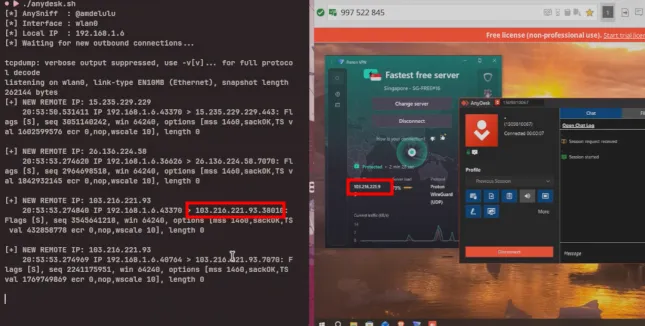
During the test, tcpdump produced:
20:45:29.907057 IP 192.168.1.6.47236 > 103.216.221.93.7070: Flags [S], seq 137922076, win 64240, options [mss 1460,sackOK,TS val 3470803047 ecr 0,nop,wscale 10], length 0

20:45:29.907240 IP 192.168.1.6.35376 > 103.216.221.93.43659: Flags [S], seq 226864075, win 64240, options [mss 1460,sackOK,TS val 970869676 ecr 0,nop,wscale 10], length 0
The destination IP observed during this test was:
103.216.221.93The two connection attempts were:
192.168.1.6:47236 → 103.216.221.93:7070
192.168.1.6:35376 → 103.216.221.93:43659
Both packets were TCP SYN packets generated around the connection attempt.
0x04 - Verifying it in Wireshark
I then checked the same traffic in Wireshark.
Using a display filter such as:
ip.addr == 192.168.1.6 && tcp.port == 7070made the relevant traffic easier to inspect.
The packet details showed:
Internet Protocol Version 4
    Source Address:      192.168.1.6
    Destination Address: 103.216.221.93

Transmission Control Protocol
    Source Port:         47236
    Destination Port:    7070
    Flags:               SYN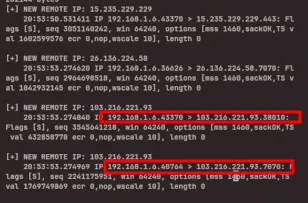
The same destination address was visible in both the tcpdump output and Wireshark.
0x05 - Direct confirmation
To isolate the observed address, I ran:
sudo tcpdump -i wlan0 -nn 'host 103.216.221.93'The resulting packets were:
20:45:29.907057 IP 192.168.1.6.47236 > 103.216.221.93.7070: Flags [S], length 0
20:45:29.907240 IP 192.168.1.6.35376 > 103.216.221.93.43659: Flags [S], length 0
This confirmed that 103.216.221.93 was an actual destination of the captured outbound TCP connection attempts.
0x06 - Repeating the test
I repeated the same procedure with multiple lab AnyDesk IDs:
- Start the packet capture on
wlan0. - Enter the lab machine’s AnyDesk ID.
- Press Connect.
- Watch for new outbound TCP SYN packets.
- Check the destination address in Wireshark or
tcpdump.
The behavior was reproducible in the controlled tests: initiating the connection generated observable outbound traffic, and the destination IP appeared in the packet headers.
The latest test produced:
103.216.221.93with connection attempts to:
7070
43659
0x07 - Result
The experiment demonstrated that, in these lab tests, an AnyDesk connection attempt generated network traffic containing a destination IP before the remote session was accepted.
The key packet was:
192.168.1.6.47236 > 103.216.221.93.7070: Flags [S]The relevant information was:
Source IP        : 192.168.1.6
Destination IP   : 103.216.221.93
Source Port      : 47236
Destination Port : 7070
TCP Flag         : SYN
This observation was reproduced across multiple controlled lab tests using Wireshark and tcpdump.